LangChain Guide: AI Terms aur Lang Ecosystem Ki Puri Jankari
Introduction
Agar aap AI applications banana chahte hain ya office/personal projects ke liye AI concepts ko aasan bhasha me revise karna chahte hain, toh ye guide aapke liye hai.
Simple Shabdo Me:
- Agar LLM (jaise GPT-4, Claude) ek car ka powerful Engine hai…
- Toh LangChain wo Chassis aur Wiring hai jo us engine ko steering wheel (Tools), GPS (Data/Files), aur fuel system (APIs) se jodti hai.
Is post me hum LangChain ke core concepts, AI ke zaroori terms, aur “Lang-” family ke sabhi tools (LangGraph, LangSmith, LangServe wagairah) ko detail me samjhenge.
1. Zaroori AI Terms (Quick Glossary)
LangChain samajhne se pehle in terms ka clear hona zaroori hai:
| Term | Aasan Matlab | Real Life Example |
|---|---|---|
| LLM (Large Language Model) | AI ka main dimag jo text samajhta aur likhta hai. | GPT-4o, Claude 3.5, Gemini, Llama 3 |
| Prompt | LLM ko diya gaya instruction ya sawal. | “Is document ki summary 3 bullet points me do.” |
| Tokens | Text ke chote tukde (words ya sub-words) jinhe LLM process karta hai. | 100 words me lagbhag 130–140 tokens hote hain. |
| Embeddings | Text/words ko numbers (vectors) me badalna taaki computer unka ‘meaning’ samajh sake. | “King” aur “Queen” ke numbers aapas me bohot paas honge. |
| Vector Database | Numbers (embeddings) ko store aur fast search karne wala special database. | Pinecone, ChromaDB, FAISS, Qdrant, Milvus |
| Semantic Search | Exact keyword match ke bajaye ‘meaning/sense’ ke hisab se search karna. | “Gadi kharab ho gayi” search karne par “Car repair” ka result milna. |
| RAG (Retrieval-Augmented Generation) | LLM ko apne private data/PDFs se context dekar accurate jawab nikalwana. | “Open-book exam” — LLM book dekh kar answer deta hai. |
| Agent | Ek aisa smart system jo khud decide karta hai ki kab kaun sa tool use karna hai. | User ne pucha “Weather batao aur email karo” — Agent pehle weather API call karega, fir email bhejega. |
| Hallucination | Jab AI model confidence ke sath galat ya banawati baat bol deta hai. | RAG use karne se hallucination kafi had tak khatam ho jati hai. |
2. “Lang” Family Ecosystem (LangChain ke Sathi Tools)
LangChain sirf ek library nahi hai, balki poora ek suite hai:
┌───────────────────────────────────────────────────────────┐
│                     LangChain Ecosystem                   │
├─────────────────┬───────────────────┬─────────────────────┤
│ 1. LangChain    │ 2. LangGraph      │ 3. LangSmith        │
│ (Core Chaining) │ (Multi-Agent/Loop)│ (Debugging & Eval)  │
├─────────────────┴───────────────────┴─────────────────────┤
│ 4. LangServe (Deploy as REST API)   │ 5. LCEL (Syntax)    │
└───────────────────────────────────────────────────────────┘
1. LangChain (Core Framework)
- Kyu use hota hai: Basic se intermediate AI pipelines banane ke liye.
- Kaam: Ye alag-alag LLMs, Prompt Templates, Output Parsers aur Vector Stores ko aapas me jodta hai.
2. LangGraph (Multi-Agent & Stateful Workflows)
- Kyu use hota hai: Jab aapko complex, loop-based ya multi-agent systems banane ho.
- Khas Baat: Standard LangChain ek sidhi line (DAG - Directed Acyclic Graph) me chalta hai (Step A → B → C). Lekin real-world agents me loops chahiye hote hain: “Tool chalao → result check karo → agar galat hai to dobara try karo”. LangGraph cyclical graphs aur state manage karne me best hai.
3. LangSmith (Monitoring, Debugging & Tracing)
- Kyu use hota hai: Production apps ko monitor aur debug karne ke liye.
- Kaam:
- LLM ne kya prompt liya aur kya exact output diya?
- Kis step par kitna time (latency) aur kitne paise (tokens/cost) lage?
- Error kaha aaya? Testing aur evaluation ke liye ye dashboard deta hai.
4. LangServe (Deployment)
- Kyu use hota hai: Apni LangChain chains aur LangGraph workflows ko 1 click me production-ready REST API (FastAPI ke sath) banane ke liye.
- Feature: Ye streaming, background tasks aur batch processing automatically support karta hai.
5. LCEL (LangChain Expression Language)
- Kyu use hota hai: Code ko chota, clean aur pipe syntax (
|) ke sath likhne ke liye. - Example:
# LCEL Example
chain = prompt | model | output_parser
response = chain.invoke({"topic": "AI"})
3. LangChain vs ChatGPT
| Feature | ChatGPT | LangChain |
|---|---|---|
| Type | Ready-made End-user Product | Developer Framework / Toolkit |
| Data Access | Public training data tak limited | Private PDFs, Internal SQL DBs, CRM, APIs |
| Customization | UI ke zariye limited customization | Full control — code me kuch bhi customize karein |
| Workflows | Single chat interface | Multi-step pipelines, automated background agents |
4. LangChain ke 4 Core Building Blocks
[ Components ] ──► [ Chains (LCEL) ] ──► [ Tools ] ──► [ Agents ]
(Parts) (Pipelines) (Powers) (Decision Maker)-
Components (Building Blocks):
- Prompt Templates: Dynamic inputs ke sath prompt banana (
"Summarize this {document}"). - Model I/O: OpenAI, Anthropic, Ollama ya HuggingFace ke models ko ek standard interface me call karna.
- Output Parsers: LLM ke raw text ko structured JSON ya Python List me convert karna.
- Prompt Templates: Dynamic inputs ke sath prompt banana (
-
Chains (Pipelines):
- Components ko sequence me jodna: Input → Prompt → LLM → Output.
-
Tools (External Powers):
- LLM ke hath-pair jo use external actions karne dete hain (e.g., Google Search, SQL Query, Calculator, Slack API).
-
Agents (Autonomous Brain):
- Ek Agent LLM ka use karke khud plan banata hai ki kaun sa tool kis sequence me chalana hai.
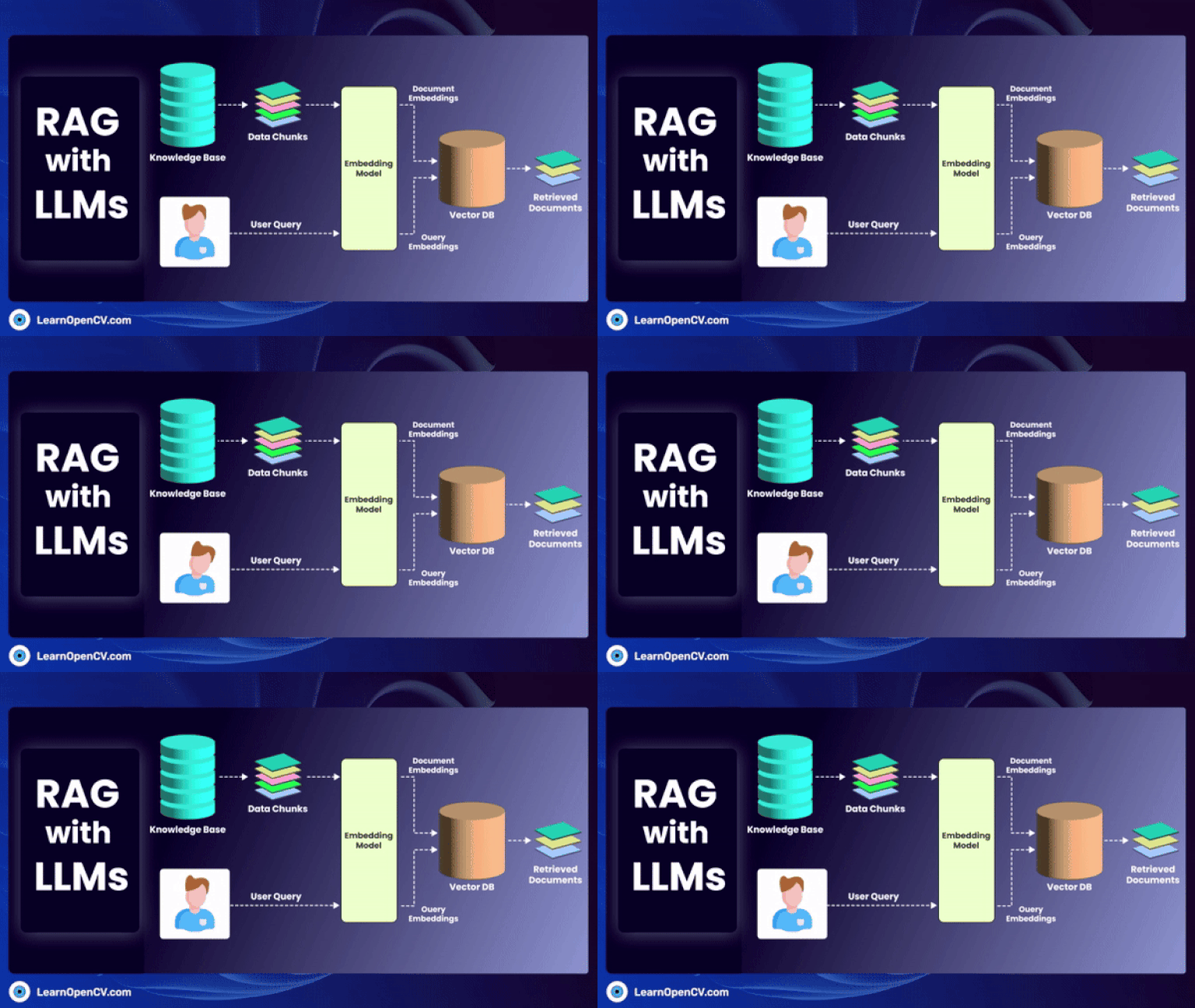
5. RAG (Retrieval-Augmented Generation) Workflow
LangChain ka sabse famous aur office use case RAG hai. Iska step-by-step workflow:
=== Phase 1: Data Preparation (Indexing) ===
[Company Docs / PDFs]
        │
        ▼ (1. Document Loader)
[Raw Text Content]
        │
        ▼ (2. Text Splitter / Chunker)
[Manageable Chunks]
        │
        ▼ (3. Embedding Model)
[Vector Numbers (Embeddings)]
        │
        ▼ (4. Storage)
[Vector Database (Chroma / Pinecone / FAISS)]

=== Phase 2: Query & Generation ===
[User Question]
        │
        ▼ (Embed Question)
[Search Query Vector]
        │
        ▼ (5. Similarity Search / Retrieval)
[Top Relevant Chunks (Context)]
        │
        ▼ (6. Context + Question to LLM)
[LLM (e.g., GPT-4o)]
        │
        ▼
[Accurate Answer (Without Hallucination)]
RAG ke Main Components:
- Document Loaders: PDF, DOCX, CSV, Notion, Web pages ko load karna.
- Text Splitters: Bade text ko chote chunks (e.g., 500-1000 characters with overlap) me todna.
- Embeddings: Text chunk ko mathematical vector me convert karna.
- Vector Store: In vectors ko fast similarity search ke liye index karna.
- Retriever: User ke query ke mutabiq sabse best context chunks nikalna.
6. Memory in LangChain (Chat History Yaad Rakhna)
By default, LLMs stateless hote hain (yani har naye prompt ke baad pichli baat bhool jate hain). Memory ka use pichli baaton (conversation history) ko yaad rakhne ke liye hota hai taaki multi-turn chat kaam kar sake.
Memory ke Common Types:
| Memory Type | Kaise Kaam Karta Hai? | Kab Use Karein? |
|---|---|---|
| ConversationBufferMemory | Poori chat history bina kisi badlav ke LLM ko pass karta hai. | Choti conversations ke liye (kyunki lambi chat me token limit cross ho sakti hai). |
| ConversationBufferWindowMemory | Sirf pichle K messages (e.g., last 5 interactions) yaad rakhta hai. | Token bachane aur recent context par focus karne ke liye. |
| ConversationSummaryMemory | LLM ka use karke pichli poori chat ki ek dynamic summary banata rehta hai. | Lambi conversation me token bachane ke sath poora context maintain karne ke liye. |
| VectorStoreRetrieverMemory | Conversation history ko vector DB me daalta hai aur relevant pichli baatein retrieve karta hai. | Boht lambi chats me jab user purani specific baat ka reference de. |
LangGraph/Modern Approach: Modern LangGraph me memory ko State / Checkpointing ke zariye manage kiya jata hai, jisse conversation state database (jaise Postgres, SQLite) me persist ho sakti hai.
7. Quick Revision Summary
- LangChain: LLM apps banane ka main framework.
- LangGraph: Complex, multi-agent aur loops wale AI agents ke liye.
- LangSmith: Debugging, cost tracking aur evaluation dashboard.
- LangServe: Chain ko REST API me badalne ke liye.
- RAG: Apni company ke private data par chatbot banane ka formula.
- Agents: LLM + Tools jo khud decide karein ki aage kya action lena hai.
- Memory: Pichli baat-cheet ka context yaad rakhne ke liye (Buffer, Window, Summary, State).