MCP Server Complete Guide: AI Data & Tools Integration, Setup aur Custom Server Banana
Introduction
AI models (jaise Claude, Gemini, GPT-4) bohot powerful hain, lekin unki sabse badi limit ye thi ki wo aapke local files, private databases (SQL, Postgres), Slack, GitHub ya internal APIs se directly jud nahi pate the. Har naye tool ke liye har company alag-alag custom code likhti thi.
Is problem ko hamesha ke liye khatam karne ke liye ek revolutionary open standard laya gaya jiska naam hai Model Context Protocol (MCP).
Simple Shabdo Me (USB-C Analogy):
- Jaise pehle har phone aur device ke liye alag charger hota tha aur fir USB-C ne aakar sabko ek universal cable se jod diya…
- Theek waise hi MCP AI models ke liye ek Universal USB-C Port hai, jo AI ko kisi bhi tool, database ya API se bina alag code likhe jod deta hai!
Is guide me hum seekhenge:
- MCP kya hai, iska itihaas (History) aur Real-Life Use Cases
- AI Terms Glossary
- MCP Architecture: Client vs Server vs Host
- Antigravity CLI (
agy) aur VS Code me MCP Setup (Step-by-Step) - Built-in & Open-Source MCP Servers Listing (GitHub, SQLite, Postgres, Puppeteer)
- Python aur Node.js me Apna Custom MCP Server Kaise Banayein
- Nateeja & Quick Revision Summary
1. Zaroori AI Terms (Quick Glossary)
| Term | Aasan Matlab | Real-Life Example |
|---|---|---|
| MCP (Model Context Protocol) | AI aur external tools ke beech baat-cheet karne ka open standard protocol. | Universal USB Cable for AI |
| MCP Host / Client | Wo application jaha AI model chalta hai aur user prompt deta hai. | Claude Desktop, Antigravity CLI (agy), VS Code (Cline/Roo Code) |
| MCP Server | Ek chota program jo kisi specific service (Database, GitHub, File system) ko AI ke samne tool ke roop me expose karta hai. | sqlite-mcp-server, github-mcp-server |
| Tools | Functions jinhe AI model execute kar sakta hai (e.g. database query, API call). | fetch_user_by_id(), send_slack_message() |
| Resources | Static ya dynamic data/files jinhe AI padh sakta hai (Read-only data). | File logs, Database schema, API documentation |
| Transports | MCP Client aur Server ke aapsi connection ka tarika (Stdio for local, SSE/HTTP for remote). | Terminal pipe (stdin/stdout) ya web URL (https://...) |
2. MCP ka Itihaas (History) aur Real-Life Use Cases
History:
- Purana Daur (Fragmented Plugins): Pehle ChatGPT Plugins ya LangChain custom tools hote the, jo sirf unke platform par chalte the. Agar aapne ek tool banaya, toh use har jagah dubara likhna padta tha.
- Anthropic dwara MCP Launch (Late 2024 - 2025): Anthropic ne MCP ko open-source standard ke roop me launch kiya.
- Industry-wide Adoption (2025 - 2026): Google Antigravity, Cursor, VS Code extensions (Cline/Continue), aur poore open-source ecosystem ne MCP ko officially support karna shuru kar diya.
Real-Life Use Cases:
- Local Database Querying: AI se kehna “Pichle hafte ke top 5 unpaid invoices PostgreSQL se nikal kar summary do”. MCP server database se connect karke live data de deta hai.
- Automated GitHub Operations: Code review karna, PRs banana aur issues close karna bina terminal me git commands likhe.
- Browser Automation: Web scraping karna ya dynamic JavaScript pages ko render karke form fill karna (Puppeteer / Playwright MCP).
- Internal Company Knowledge: Google Drive, Notion ya Jira se company policies AI ke context me lana.
3. High-Level Architecture (Kaise Kaam Karta Hai?)
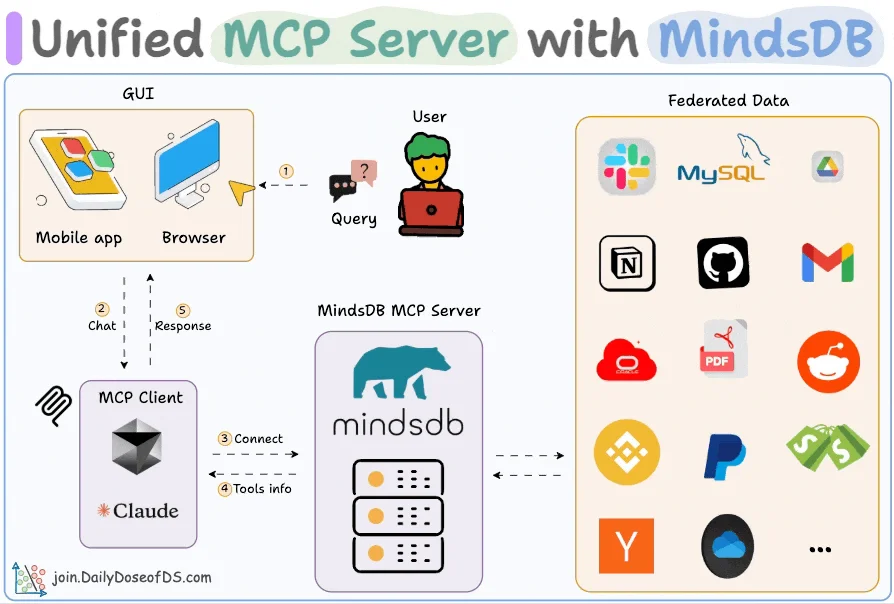
MCP ka architecture bilkul saaf aur 3 layers me hota hai:
┌───────────────────────────────────────────────────────────┐
│                        MCP HOST                           │
│   (Antigravity CLI / VS Code / Claude Desktop)            │
│                            │                              │
│                            ▼                              │
│                   [ AI Model / LLM ]                      │
└────────────────────────────┬──────────────────────────────┘
                             │ JSON-RPC 2.0 Protocol
                             │ (Stdio / SSE Transport)
                             ▼
┌───────────────────────────────────────────────────────────┐
│                       MCP SERVERS                         │
├─────────────────┬───────────────────┬─────────────────────┤
│ 1. SQLite / DB  │ 2. GitHub MCP     │ 3. Filesystem MCP   │
│    Server       │    Server         │    Server           │
├─────────────────┼───────────────────┼─────────────────────┤
│ [Local SQLite]  │ [GitHub REST API] │ [Disk / Projects]   │
└─────────────────┴───────────────────┴─────────────────────┘
Protocol ke 2 Main Transport Modes:
- Stdio (Standard Input / Output): Local machine par chalne wale servers ke liye. Host process choti CLI command chalata hai aur
stdin/stdoutse baat karta hai. Fast aur lightweight hota hai. - SSE (Server-Sent Events / HTTP): Cloud ya remote servers ke liye jaha MCP server kisi URL (e.g.
https://mcp.mycompany.com/sse) par host hota hai.
4. MCP Server Setup: Antigravity CLI (agy) aur VS Code me
A. Antigravity CLI (agy) me Setup:
Antigravity CLI me global configuration file ~/.gemini/config/mcp_config.json hoti hai.
- Config File Edit Karein:
{ "mcpServers": { "sqlite-database": { "command": "uvx", "args": ["mcp-server-sqlite", "--db-path", "/home/ahmad/projects/app.db"] }, "github-tools": { "command": "npx", "args": ["-y", "@modelcontextprotocol/server-github"], "env": { "GITHUB_PERSONAL_ACCESS_TOKEN": "ghp_your_token_here" } } } } - Session Start Karein:
agystart karte hi saare tools auto-discover ho jate hain aur AI ke toolset me jud jate hain.
B. VS Code (Cline / Roo Code / Continue) me Setup:
- VS Code me extension settings kholein (ya
cline_mcp_settings.json). - Upar wala same JSON format paste karein.
- Extension reload karein — Green status indicator dikhega jo batayega ki server connect ho chuka hai.
5. Popular Ready-Made MCP Servers (Listing Kaha Dekhein?)
Aapko har cheez ke liye naya code likhne ki zaroorat nahi hai. Hazaron ready-made MCP servers open-source available hain:
| Category | Server Name / Package | Command |
|---|---|---|
| Databases | mcp-server-sqlite / postgres-mcp |
uvx mcp-server-sqlite --db-path ./test.db |
| Git & Code | @modelcontextprotocol/server-github |
npx -y @modelcontextprotocol/server-github |
| Web Automation | @modelcontextprotocol/server-puppeteer |
npx -y @modelcontextprotocol/server-puppeteer |
| Filesystem | @modelcontextprotocol/server-filesystem |
npx -y @modelcontextprotocol/server-filesystem /path |
| Memory / Graph | @modelcontextprotocol/server-memory |
npx -y @modelcontextprotocol/server-memory |
Official Listings & Repositories:
- Official GitHub Repo:
https://github.com/modelcontextprotocol/servers - Smithery Directory:
https://smithery.ai(One-click install listing) - Glama MCP Registry:
https://glama.ai/mcp/servers
6. Hands-On: Apna Custom MCP Server Kaise Banayein?
Agar aapki company ka koi custom API ya calculation tool hai, toh aap kuch hi lines me custom MCP server bana sakte hain.
Method 1: Python me FastMCP use karke (Recommended)
-
Library Install Karein:
pip install mcp -
server.pyBanayein:from mcp.server.fastmcp import FastMCP # Server initialize karein mcp = FastMCP("CompanyFinanceTools") # Custom Tool define karein @mcp.tool() def calculate_tax_deduction(income: float, investment: float) -> str: """Calculates net taxable income and tax saved under standard deductions.""" deduction = min(investment, 150000.0) # 80C limit taxable_income = max(0.0, income - deduction) return f"Deduction Applied: ₹{deduction}, Net Taxable Income: ₹{taxable_income}" if __name__ == "__main__": mcp.run() -
mcp_config.jsonme Add Karein:{ "mcpServers": { "my-finance-tool": { "command": "python3", "args": ["/home/ahmad/projects/server.py"] } } }
Method 2: Node.js / TypeScript me MCP Server Banana
import { Server } from "@modelcontextprotocol/sdk/server/index.js";
import { StdioServerTransport } from "@modelcontextprotocol/sdk/server/stdio.js";
import { CallToolRequestSchema, ListToolsRequestSchema } from "@modelcontextprotocol/sdk/types.js";

const server = new Server({ name: "my-node-tool", version: "1.0.0" }, { capabilities: { tools: {} } });

server.setRequestHandler(ListToolsRequestSchema, async () => ({
  tools: [{
    name: "ping_server",
    description: "Check if the internal backend service is healthy",
    inputSchema: { type: "object", properties: { serviceName: { type: "string" } } }
  }]
}));

server.setRequestHandler(CallToolRequestSchema, async (request) => {
  if (request.params.name === "ping_server") {
    return { content: [{ type: "text", text: `Service ${request.params.arguments?.serviceName} is running OK!` }] };
  }
  throw new Error("Tool not found");
});

const transport = new StdioServerTransport();
await server.connect(transport);
7. MCP Best Practices & Security
- Least Privilege Principle: MCP server ko database me hamesha read-only access dein jab tak write permissions zaroori na ho.
- Environment Variables: API keys ya tokens ko JSON config me hardcode karne ke bajaye
envblock ya.envse pass karein. - Keep Tools Specific: Ek tool sirf ek kaam kare (Single Responsibility Principle) taaki AI confusion me galat tool na chala de.
8. Nateeja (Conclusion)
Model Context Protocol (MCP) ne AI development ko hamesha ke liye badal diya hai. Ab developers ko har tool aur database ke liye alag-alag AI integration likhne ki zaroorat nahi hai.
Chahe aap Antigravity CLI (agy), VS Code ya koi bhi modern AI agent use kar rahe hon, MCP aapke AI ko real world se connect karne ka sabse fast, secure aur standardized tarika hai.
9. Quick Revision Summary
- MCP: AI aur tools/databases ke beech universal open communication standard.
- Analogy: AI ke liye USB-C port.
- 3 Main Components: Host (Client/IDE), Protocol (JSON-RPC), aur Server (Tools/DB).
- Transport Types: Stdio (Local processes) aur SSE (Remote cloud URLs).
- Configuration:
mcp_config.jsonme command, args aur env set karke chalta hai. - Custom Development: Python me
FastMCPya Node.js@modelcontextprotocol/sdkse 5 minute me custom server banaya ja sakta hai.